
Guide & FAQs
- Home
- Guide & FAQs
How to Set Up TripAid for Your Next School Trip
Once your school's EVC has registered on the TripAid website, follow these three simple steps to get your teachers and students set up and ready to go.
01
Create your trip!
For your pupils' security, every TripAid group is created by the school's Educational Visits Coordinator. Once logged in to the website, the EVC can set up a new trip in just a few clicks.
Simply select a start time, end time and trip name. TripAid will then generate two unique join codes: one for teachers and one for students, ready to share before the visit.
02
Review your trip!
The teacher code can be emailed internally to staff joining the trip or shared verbally before departure. The student code can be distributed via your school's usual communication process or included directly on the parental consent form.
To make this even easier, TripAid provides a parental consent letter template you can use straight away. Teachers and students then download the app, enter their name and unique code, and are automatically added to the trip messaging group.
03
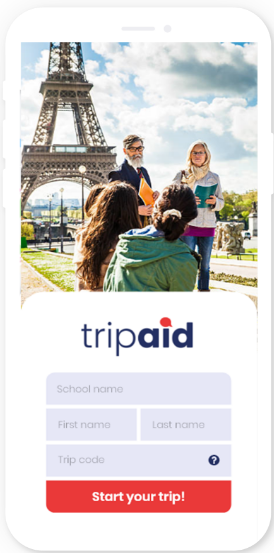
Start your trip!
Once the trip start time arrives, any teacher can check the register of joined participants and press "Begin Trip" in the app. This activates live location sharing and trip messaging for the whole group, and automatically voids the join codes so no one else can join.
During the trip, teachers can edit the end time, add new students via a temporary code, or remove members if needed. When the trip ends, the group shuts down automatically and no member can locate or message anyone else, keeping everyone's privacy intact after the visit.
TripAid FAQs
What happens to the data collected during the trip?
Full details of how your data is collected and processed are set out in our Privacy Policy, but here are the key points to be aware of.
Student data
Type 1 data – name, school, online/offline status and last online time.
This data is visible to teachers on the same TripAid group during the trip. The school's EVC and authorised TripAid staff can access this data for up to 30 days after the trip ends, after which it is automatically and permanently deleted.
Type 2 data – last known location, chat messages, message read receipts and device ID.
This data is end-to-end encrypted and can only be viewed by teachers on the same TripAid trip. Neither the school EVC nor TripAid staff can access this data. It is stored securely on UK-based servers for 30 days and can only be accessed by law enforcement officers where a suspected crime has taken place during the visit.
Teacher data
Teachers share the same two types of data as students, with one difference: Type 1 data (name, school and online status) is visible to all students and teachers within the same TripAid group during the trip.
What happens if a pupil's/teacher's phone runs out of battery or gets switched off?
We recommend that all current trip procedures that your school has are still in place and that pupils know in advance where and when to meet if they are on an activity without a teacher. TripAid is designed to be an additional layer of safety for school trips, and risk assessments/planning for trips should always factor in what happens if technology fails.
Does the app always need to be open on my phone for it to work? ?
For location sharing to function, TripAid needs to be running in the background on your device at all times during the trip. As long as the app is open in the background, your location will be visible to the relevant teachers or students on your trip.
If the app is fully closed, you will still receive messages and notifications from other users, but your location will no longer be shared and you will appear as "offline" to other members of the group. We recommend that all users keep the app running in the background for the duration of the trip to get the most out of TripAid's safeguarding features.
Can a student still be tracked if they turn off location sharing on their phone?
No. If a student turns off location sharing on their device, their location will no longer be visible to teachers on the trip. However, they will still be able to send and receive messages within the TripAid group, so teachers can still communicate with them directly.
We recommend that schools remind students to keep location sharing enabled throughout the trip as part of their pre-trip briefing, to ensure TripAid's safeguarding features work as intended.
Can parents join the TripAid group?
No. TripAid groups are restricted to teachers and students on the trip only. It would not be appropriate for parents to join a group, as they have not been granted permission by the school to share or view location data within that group.
If a parent attempts to join using a student code, the teacher should eject them from the group before the trip begins. Teachers can see all members who have joined via the register in the app, so it is straightforward to identify and remove anyone who should not be there.
Parents who wish to stay in contact with their child during a trip can do so through the variety of messaging and location apps already available to them. TripAid is designed exclusively for teacher-to-student safeguarding on educational visits.
Can pupils message or locate each other directly?
No. Students can only locate and message teachers on their TripAid group. They cannot see the location of, or message, other students at any time during the trip.
Teachers have full visibility of both students and other staff on the trip, and can locate and message any individual or the whole group as needed.
This is a deliberate safeguarding feature of TripAid, designed to keep all communication between pupils and responsible adults, and to prevent unsupervised peer-to-peer contact during an educational visit.
Can a teacher or student change the start and end time of the trip?
Teachers can edit the start and end time of a TripAid group during the visit if needed. Students cannot make any changes to the trip settings at any time.
Whenever a teacher makes a change to the trip times, every member of the group receives an automatic notification on their device. The school's EVC also receives an email detailing the change, ensuring the right people are always kept informed and that any amendments are fully transparent and logged.
Can we use TripAid if some students/teachers don’t have phones?
Yes. We recommend that schools use TripAid on every trip, even if some students or teachers do not have a smartphone available. TripAid works effectively as long as at least one person in each group has a device with the app running.
Students should always be following your school's existing safety procedures during a trip, such as not moving around in groups of fewer than three. As long as one member of each group has TripAid running on their phone, that group can still be located and messaged by teachers throughout the visit.
TripAid is designed to complement your school's existing safeguarding procedures, so it remains a valuable additional layer of safety regardless of how many devices are available on the day.
Why use TripAid instead of other free messaging or location sharing apps?
Most popular messaging and location sharing apps require users to share personal contact details, such as phone numbers, before they can communicate. On a school trip this means students can save their teacher's number and teachers can save students' numbers, creating a risk of unwanted or inappropriate contact long after the trip has ended.
TripAid removes this risk entirely. Teachers and students can locate and message each other throughout the trip without ever sharing personal contact details. When the trip ends, the group closes automatically and all users regain their full privacy.
This makes TripAid the only messaging and location sharing tool specifically designed with school trip safeguarding in mind, keeping communication professional, appropriate and fully contained within the duration of the educational visit.
What happens if a student misses a trip but has joined a TripAid messaging group?
Any student can remove themselves from a TripAid group at any time. Teachers can also remove any pupil from the group in just a few taps on the app.
This means that if a student is absent on the day, leaves the trip early due to illness or injury, or simply needs to be removed for any other reason, it can be handled quickly and easily by the teacher without any disruption to the rest of the group.
Once removed, the student can no longer locate or message anyone in the group, and their data is handled in line with TripAid's standard privacy settings.
What happens if a phone gets lost or stolen on the trip?
Any lost or stolen phone should be reported to a teacher immediately. The teacher should then remove that person from the TripAid group as soon as possible, preventing any unauthorised access to the group's location data or messages.
If the phone is subsequently recovered, the teacher can reinstate the pupil or staff member to the group quickly and easily via the app menu, restoring their access without needing to rejoin with a code.
What happens when the schools TripAid subscription is about to expire?
As your subscription approaches its expiry date, the school's EVC will receive a series of reminder emails with plenty of notice to act.
If auto-renewal was selected when the subscription was first purchased, no further action is needed and the TripAid service will continue uninterrupted.
If auto-renewal was not selected, the reminder emails will include a direct link to the payment page where the EVC or the school's finance team can purchase a new annual subscription. As long as renewal is completed before the expiry date, there will be no interruption to the TripAid service for your school.
How does a school cancel their TripAid subscription?
Schools can cancel their TripAid subscription within the first 60 days of their annual subscription period. For full details of the cancellation process and terms, please refer to clause 4.2 of our Terms and Conditions.
Does TripAid work on trips abroad?
Yes. TripAid works on international trips and all features, including live location sharing and messaging, function exactly as they do on domestic visits.
To ensure the app works correctly abroad, all users will need to have data roaming enabled on their device before the trip departs. We recommend that schools include a reminder to enable data roaming in their pre-trip briefing or on the parental consent form.
Do students or teachers have to pay to use TripAid?
No. The TripAid app is a free download and there is no cost for individual teachers or students to use it. The only charge is the school's annual subscription, which covers all teachers and students at that school.
The only additional cost users may incur is standard mobile data usage, which is comparable to any other messaging app. Schools may wish to include a note about data usage on the parental consent form, particularly for trips abroad where roaming charges may apply.
" What a perfect app to help me on school trips "
LORRAINE PRICE, TEACHER